
👩💼 How to properly set up your team members in Cowlendar
Complete guide to setting up and managing team members in Cowlendar.
This is perfect regardless of whether a 2 person team or even 100+ people team.
Why setting up team members is key to managing availability and services efficiently
If your business involves multiple staff members offering services, configuring team members in Cowlendar is essential. By assigning specific availabilities and linking services to each team member, you can ensure accurate scheduling, avoid double bookings, and give your team more control over their own calendars.
How to access the team members settings
To configure your team members:
- Go to your Cowlendar Dashboard
- In the left-hand menu, click on Team
- Click Add a teammate to create a new member, or select Edit next to an existing team member
Team member profile sections
Each teammate has four tabs: General, Availabilities, Buffer time and Permissions. Each team member’s profile is divided into these tabs to help you manage their settings more easily:
General tab
Set the member’s first name, last name, and email New: You can now upload a profile image for each team member
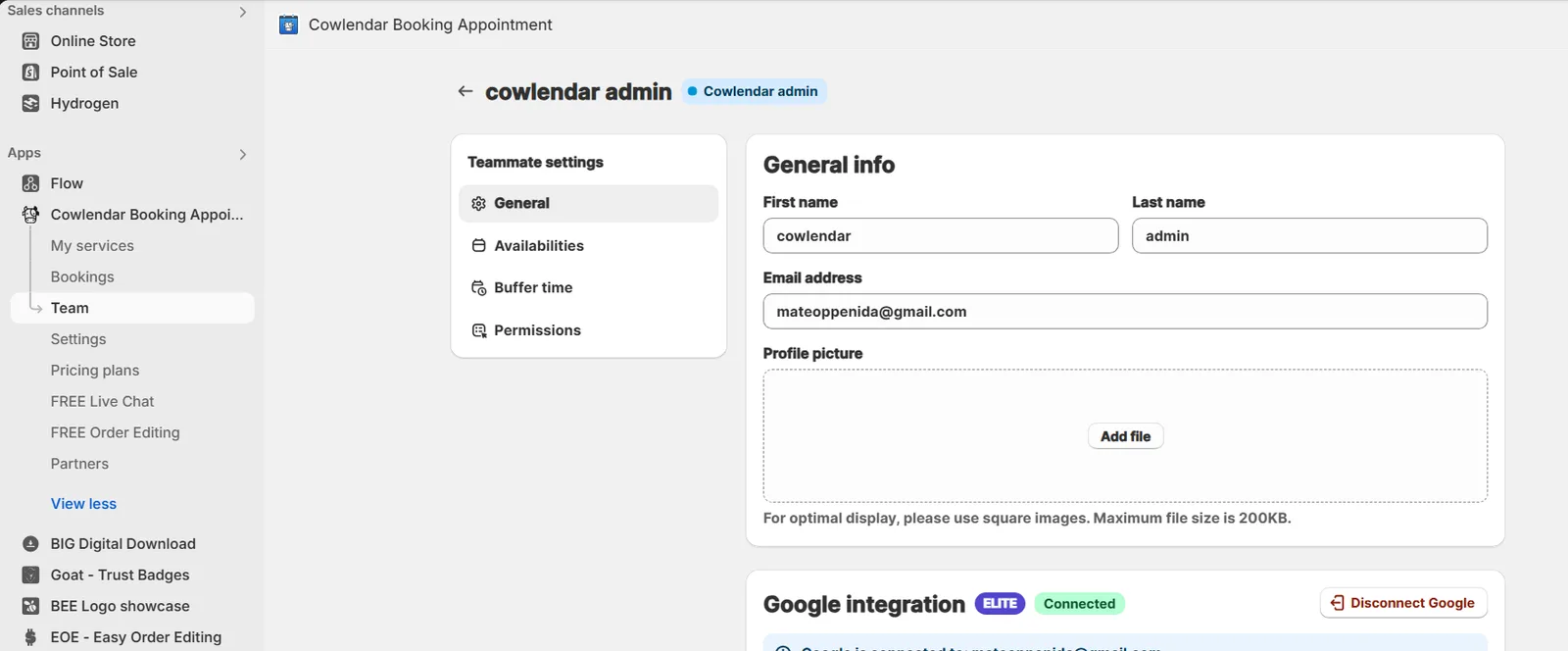
Connect their Google Calendar Add a Zoom account Connect their Outlook calendar

How to Create and Assign Teammates in Cowlendar›Make sure your services are set to “Availability per team member” in the service settings — this is required to properly assign them to your team members
Availabilities
Use the new availability format that lets you configure weekdays and specific dates in the same place This gives you more flexibility and accuracy when defining when each team member is available

Buffer time
Define a global buffer time for all the services that the team member is assigned to

Permissions
You can now control what your team members can see and do within the team portal:
Allow access to their own bookings Let them manage their own availability New: Hide booking prices from the team portal New: Hide customer contact info from the team portal

By setting up your team this way, you’ll streamline your operations and empower your staff with just the right level of access and flexibility.
Did this answer your question?