
🧠 How to Set Up Recurring Service Subscription in Cowlendar
Complete guide to setting up recurring service subscriptions and memberships in Cowlendar.
Subscriptions are available only for Regular booking services.
Subscriptions are one of the most requested and powerful features in Cowlendar.
They allow you to offer recurring bookings with recurring payments, directly tied to your services, so customers can commit long‑term while you generate predictable revenue.
With Subscriptions, you can:
- Sell time‑based services on a recurring basis
- Automatically bill customers at fixed intervals
- Give customers booking credits they can use flexibly
- Create multiple subscription plans inside the same service
Key Strengths of the Subscription Feature
Recurring revenue with automated billing via Shopify Multiple subscription plans per service (customers choose the one they want) Fully customizable rules (commitment, credits, booking limits) Customer self‑management (pause / cancel, if enabled) Flexible booking model using credits instead of fixed dates Perfect for routines, programs, and long‑term engagements
Each subscription is independent, clearly displayed, and easy for customers to understand when booking.
What You Can Build With Subscriptions
Subscriptions allow you to sell recurring access to time slots.
Instead of selling a single appointment, you sell:
A billing cycle (weekly, monthly, yearly, etc.) A set number of booking credits per cycle A commitment structure, if needed
Important concept: 1 credit = 1 booking
How to Enable Subscriptions
From your Shopify admin, go to Apps Open Cowlendar Go to My Services Click Edit on your service
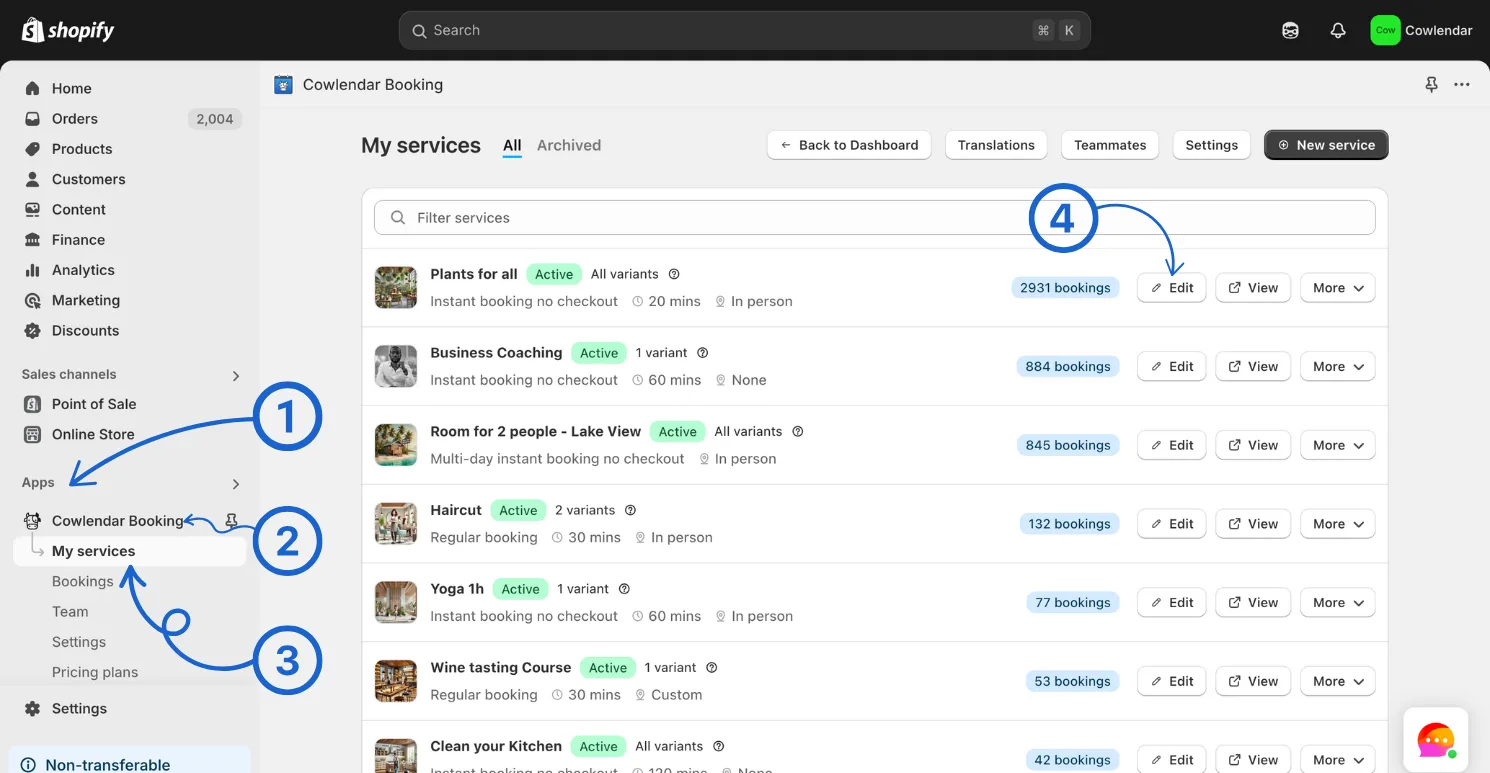
Make sure the service type is Regular booking Go to the General tab Scroll to the bottom and find the Subscriptions section
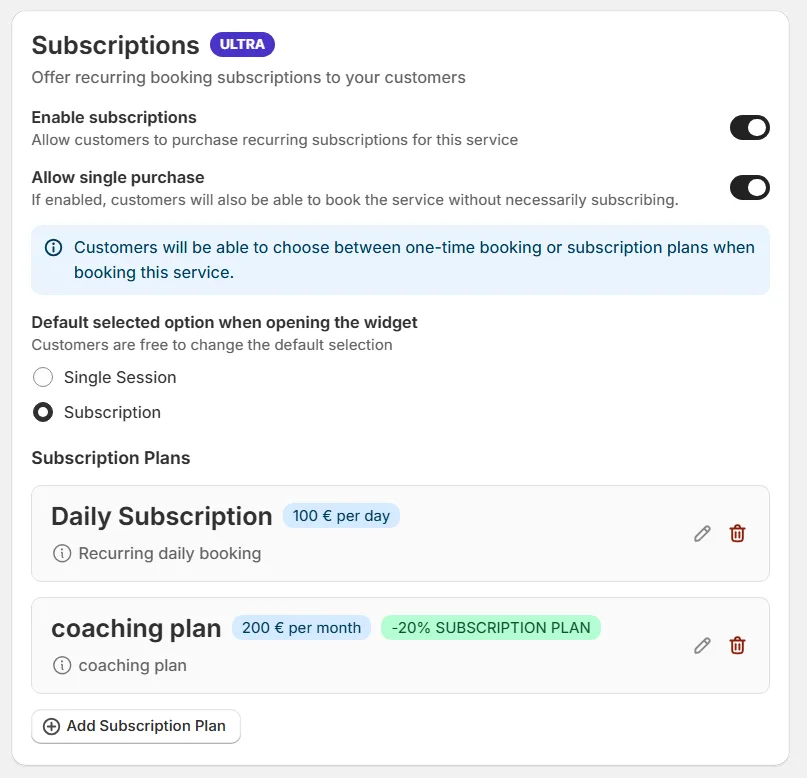
Enable Subscriptions Create and customize your subscription plans
Subscription Configuration – Step by Step
Each service can contain multiple subscription plans. Customers will see them and select the one that best fits their needs.
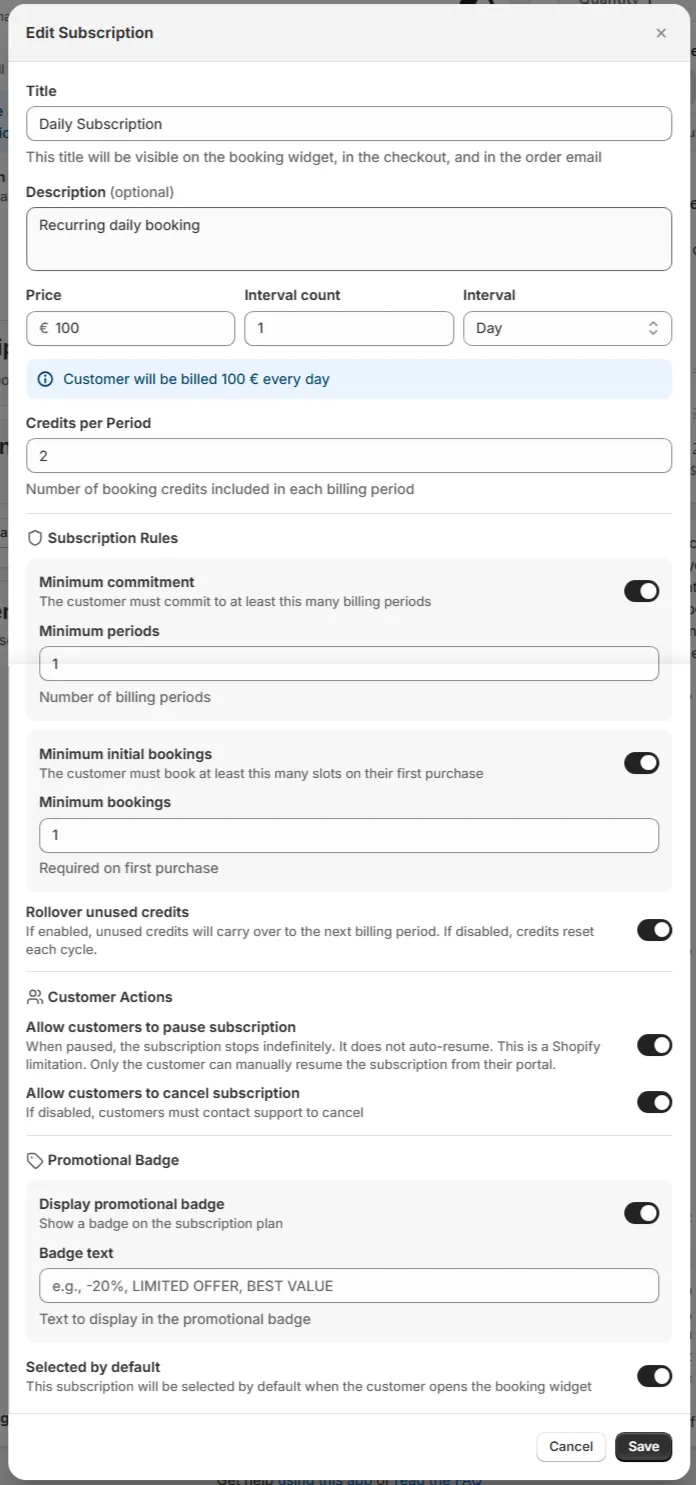
1. Title and Description
Each subscription has:
Title: Visible to customers (e.g. Monthly Yoga Pass) Description: Explain what’s included, rules, or benefits
This helps customers clearly compare plans.
2. Price
This is the recurring amount charged to the customer.
Example:
- Price: $100
This price will be charged repeatedly based on the interval configuration.
3. Billing Interval
Interval Count
Defines how often the charge occurs.
Interval
Choose the billing unit:
- Day
- Week
- Month
- Year
Example:
- Price: $100
- Interval count: 1
- Interval: Month
➡️ The customer will be billed $100 every month.
4. Credits Per Period
This defines how many bookings the customer can make per billing cycle.
- 1 credit = 1 booking
- Credits refresh every billing period
Examples:
- 4 credits per month → up to 4 bookings per month
- 20 credits per month → ideal for daily or frequent services
5. Subscription Rules (Optional)
These rules can be enabled or disabled independently for each subscription.
Minimum Commitment
The customer must stay subscribed for a minimum number of billing periods.
Examples:
- 3 months minimum
- 6 billing cycles
Useful to:
- Reduce churn
- Secure long‑term clients
- Support structured programs
Minimum Initial Bookings
Defines how many bookings the customer must schedule when purchasing the subscription.
Examples:
- Require at least 2 bookings on first purchase
- Force initial planning and commitment
6. Customer Actions (Optional)
Allow Customers to Pause Subscription
When enabled:
- Customers can pause their subscription indefinitely
- Billing stops while paused
- Subscriptions do not auto‑resume (Shopify limitation)
- Only the customer can resume from their Shopify customer portal
Useful for:
- Vacations
- Temporary schedule changes
Allow Customers to Cancel Subscription
- If enabled: customers can cancel anytime (respecting minimum commitment)
- If disabled: customers must contact support to cancel
7. Promotional Options
Promotional Badge
- Display a badge on the subscription plan
- Useful for highlighting best value or recommended plans
Selected by Default
- Automatically pre‑selects this subscription in the booking widget
- Ideal for guiding customers toward your preferred option
Managing the Subscription as a Customer
🧍 How Your Customers Manage & Renew Subscriptions›Managing the Subscription as an Admin
👨🍳 How Admins Manage Subscriptions in Cowlendar›Use Cases by Industry:
🧑⚕️ Use Case: Wellness & Fitness - Selling Class Passes and Monthly Memberships› 📚 Use Case: Education & Coaching - Setting Up Recurring Tutoring Sessions› 🐕🦺 Use Case: Automating Monthly Home or Professional Maintenance Services›Final Notes
Subscriptions transform Cowlendar from a simple booking tool into a long‑term business engine.
They are best used when:
- Services are recurring
- Clients benefit from routines
- Predictable revenue matters
If you offer time‑based services and want stability, Subscriptions are one of the most powerful tools available in Cowlendar.
Reminder: Subscriptions are available only for Regular booking services.
Did this answer your question?