
🔔 Webhooks (Beta): Real-Time Notifications for Your Bookings
Set up Cowlendar webhooks: the 8 events, request headers, how to verify the HMAC-SHA256 signature with Node and Python code, retries and how to troubleshoot.
A webhook is a message that Cowlendar sends to your server the moment something happens: a booking is created, canceled, rescheduled and more. You do not have to keep asking the API.
Use webhooks together with the Public API (Beta) to build integrations with your CRM, ERP, or any custom app.
Where to find it: Shopify admin > Apps > Cowlendar Booking > Settings > Webhooks.

The Webhooks page
The table lists your endpoints with these columns:
| Column | What it shows |
|---|---|
| Endpoint | The name and the URL. |
| Events | How many events the endpoint receives. |
| Status | Active or Inactive. |
| Last delivery | The HTTP code your server answered (for example 200) and the date. |
| Actions | Test, See deliveries, pause or play, edit and delete. |
Step 1: Add an endpoint
The signing secret is shown in full only once at creation. Store it securely. You will need it to verify incoming requests.
- Open Settings > Webhooks.
- Click Add endpoint.
- In the window Add webhook, type a name in the Name field (up to 60 characters, for example Zapier sync). Then enter your server address in URL, which must use HTTPS. Under Events, tick each event you want to receive. Click Create.
- Copy the signing secret and keep it safe.
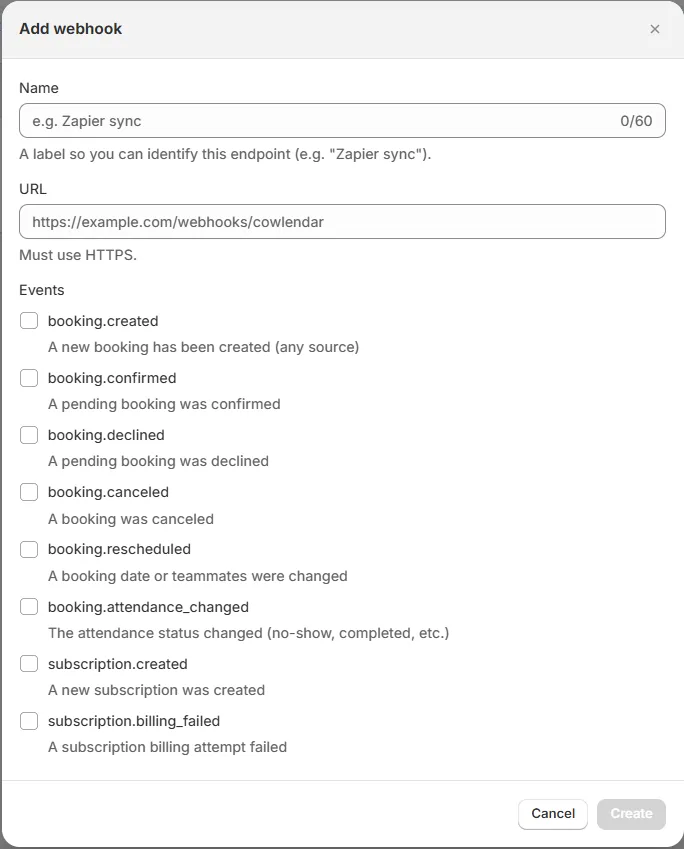
Your endpoint must be a public HTTPS address that answers with a 2xx status within 10 seconds.
The 8 events
| Event | Sent when |
|---|---|
booking.created |
A booking is created. |
booking.confirmed |
A pending booking is confirmed. |
booking.declined |
A pending booking is declined. |
booking.canceled |
A booking is canceled. |
booking.rescheduled |
A booking is rescheduled. The previous field has the old dates and teammates. |
booking.attendance_changed |
The attendance of a booking changes. The previous field has the old attendance. |
subscription.created |
A subscription is created. |
subscription.billing_failed |
A subscription payment fails. The previous field has the previous failure count. |
Every payload has id, type, created_at, shop_domain and data (the booking or the subscription).
Request headers
Every request Cowlendar sends has these headers:
| Header | Use |
|---|---|
X-Cowlendar-Event-Id |
Unique id of the event. Save it to avoid processing the same event twice. |
X-Cowlendar-Event-Type |
The event name, for example booking.created. |
X-Cowlendar-Timestamp |
Unix time in seconds when it was sent. |
X-Cowlendar-Signature |
The signature, in the format t=<timestamp>,v1=<hex>. |
Verify the signature
Always verify the signature before you trust a request.
- Read the raw body of the request, exactly as received (do not parse and re-serialize it).
- Read
X-Cowlendar-Timestamp. - Build the text
<timestamp>.<raw body>: the timestamp, a dot, then the raw body. - Calculate HMAC-SHA256 of that text with your signing secret.
- Compare the result, in hex, with the
v1=value ofX-Cowlendar-Signature. Use a constant-time comparison. - Reject the request if the timestamp is more than 5 minutes old.
Node.js:
const crypto = require("crypto");

function verify(rawBody, timestamp, signatureHeader, secret) {
  const age = Math.abs(Date.now() / 1000 - Number(timestamp));
  if (age > 300) return false;
  const expected = crypto
    .createHmac("sha256", secret)
    .update(`${timestamp}.${rawBody}`)
    .digest("hex");
  const received = signatureHeader.split(",").find((p) => p.startsWith("v1=")).slice(3);
  const a = Buffer.from(expected);
  const b = Buffer.from(received);
  return a.length === b.length && crypto.timingSafeEqual(a, b);
}
Python:
import hmac, hashlib, time

def verify(raw_body: bytes, timestamp: str, signature_header: str, secret: str) -> bool:
    if abs(time.time() - int(timestamp)) > 300:
        return False
    message = timestamp.encode() + b"." + raw_body
    expected = hmac.new(secret.encode(), message, hashlib.sha256).hexdigest()
    received = next(p for p in signature_header.split(",") if p.startswith("v1="))[3:]
    return hmac.compare_digest(expected, received)
Retries
If your server does not answer with a 2xx within 10 seconds, Cowlendar retries the delivery: after 1 minute, 5 minutes, 25 minutes, 2 hours, 10 hours and 50 hours. After about 20 failures in a row, the endpoint is turned off automatically and its status changes to Inactive. Fix the problem and turn it on again with the play button.
Test and troubleshoot
- Test: sends a test request to your endpoint.
- See deliveries: shows the deliveries Cowlendar tried, to understand why one failed.
- Pause / play: turns an endpoint off or on.
- Edit and delete: change or remove an endpoint.
Quick fixes:
| Problem | What to check |
|---|---|
| The last delivery shows a red code | Your server answered with an error. A 302 means your URL redirects; use the final URL. |
| The signature never matches | You are using the parsed body instead of the raw body, or the wrong secret. |
| The endpoint became Inactive | It failed about 20 times in a row. Fix your server and press play. |
| You receive the same event twice | Use X-Cowlendar-Event-Id to ignore duplicates. |

Related
Cette réponse a-t-elle résolu votre question ?