
🔄 Rescheduling and Cancellation Rules for Your Customers
Set the minimum notice to reschedule or cancel, limit how many times a customer can reschedule and show or hide the buttons in emails in Cowlendar.
Customers change their plans. Cowlendar lets them reschedule or cancel by themselves, and lets you set the rules so it works for your business: no last-minute changes, a limit of reschedules, or no self-service at all.
Where to find it: My services > Edit on a service > Advanced tab > card Options.
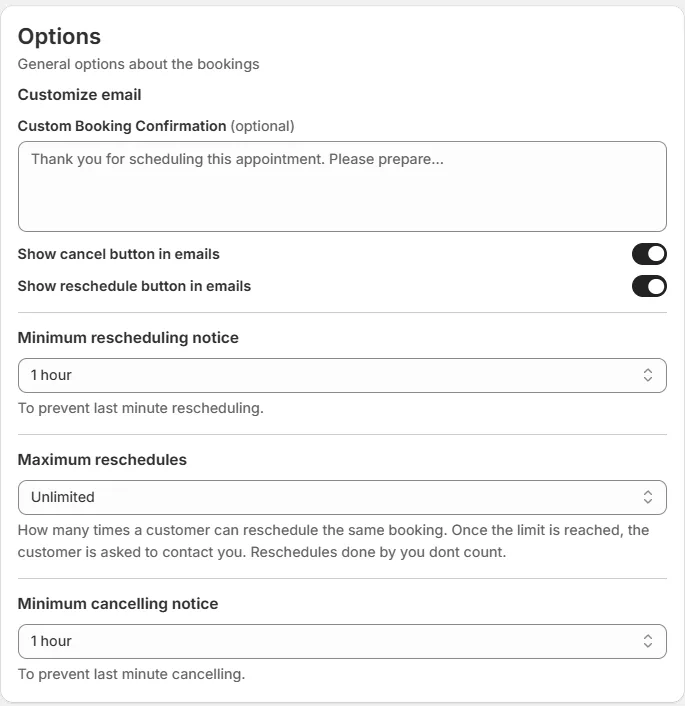
The options
| Option | What it does |
|---|---|
| Show cancel button in emails | When on, the emails to the customer include a button to cancel the booking. |
| Show reschedule button in emails | When on, the emails include a button to reschedule. |
| Minimum rescheduling notice | The customer cannot reschedule if the appointment is closer than this time. It is there to prevent last-minute rescheduling. |
| Maximum reschedules | How many times a customer can reschedule the same booking. Once the limit is reached, the customer is asked to contact you. Reschedules done by you do not count. |
| Minimum cancelling notice | The customer cannot cancel if the appointment is closer than this time. It is there to prevent last-minute cancelling. |
Both Show ... button in emails switches are on by default. The notice dropdowns show a value such as 1 hour, and Maximum reschedules can be a number of times (for example 1 time) or Unlimited.
Turning the buttons off in the emails is the way to stop customers from changing their booking by themselves.
Examples
A barber who needs 24 hours to refill the schedule. Set Minimum cancelling notice and Minimum rescheduling notice to 24 hours.
A class with a fixed schedule. Set Maximum reschedules to 1 time. A second attempt asks the customer to contact you.
A rental where you handle every change by hand. Turn off both Show ... button in emails switches.
Where customers manage their bookings
Customers can also manage their bookings from their Shopify customer account. See How Customers Can Manage Their Bookings from Shopify.
The texts customers see
The reschedule and cancel pages use the texts of Settings > Translations > Calendar translation > Cancellation and rescheduling page (Reschedule booking?, Your booking was successfully rescheduled, Cancel Booking?, Booking cancelled, and more). See Translations: Customize Every Text of Your Booking Widget.
Refunds when a booking is canceled
When a booking is canceled, whether the order is canceled and the customer refunded automatically is decided in Settings > General settings > Refund and cancellation settings. It has five switches, all off by default:
- Automatically cancel order when booking is cancelled by admin
- Automatically refund customer when booking is cancelled by admin
- Automatically cancel order when booking is cancelled by customer
- Automatically refund customer when booking is cancelled by customer
- Automatically cancel booking when order is cancelled by admin
If the order payout has already been sent to your bank, no refund is processed because the funds are no longer available.
See How to Automatically Refund Canceled Bookings and When a Customer Cancels an Appointment, Do They Get Refunded?.
Rescheduling from Google Calendar
If a teammate's Google Calendar is connected, you can allow rescheduling and canceling from Google. These are two switches in the teammate's General tab: Allow rescheduling bookings from Google Calendar and Allow canceling bookings from Google Calendar. See Teammate Settings: General, Availabilities, Buffer Time and Permissions.
Common questions
The customer says the reschedule link does not work.
Check Minimum rescheduling notice and Maximum reschedules: the appointment may be too close, or the customer may have reached the limit.
Do my own reschedules count toward the limit?
No. Reschedules done by you do not count.
Cette réponse a-t-elle résolu votre question ?