
🧭 Availability per Equipment: Rent Bikes, Courts, Tables and More
Set up Availability per equipment in a Cowlendar service: add equipment, pick a template, set minimum, maximum and default quantities, and define your schedule.
Cowlendar has three ways to decide when a service can be booked: Availability per service, Availability per teammate and Availability per equipment. This article is about the third one, used when what limits your business is the number of items you have, not the people.
Examples: 10 mountain bikes, 4 padel courts, 12 restaurant tables, 2 boats.
If you have not created your equipment yet, start with The Equipments Page: Manage Your Bikes, Courts, Tables and More.
The three modes
| Mode | Description shown in Cowlendar | Best for |
|---|---|---|
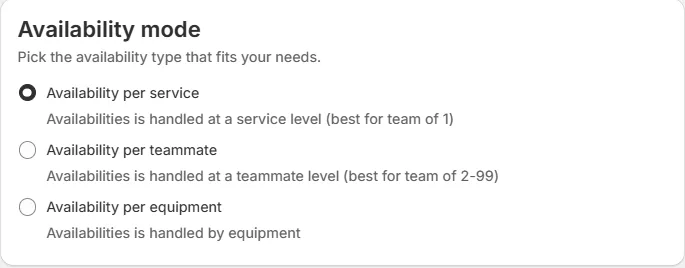
| Availability per service | Availabilities is handled at a service level | A team of 1. |
| Availability per teammate | Availabilities is handled at a teammate level | Teams of 2 to 99. |
| Availability per equipment | Availabilities is handled by equipment | Rentals and reservations limited by items. |
You choose the mode in the Availability tab of the service, in the card Availability mode.
Set it up
- Open My services and click Edit on the service.
- Go to the Availability tab.
- In Availability mode, choose Availability per equipment.
- A new card called Equipments appears: Define the equipments available for this service.
- Under Set bookable equipments (Select all the equipments that customers can book for this service) you see the equipment already attached, each with a red trash icon to remove it. Click Add equipment to attach another one.
- In Pick a template, choose the template for the service. The template available for rentals is Regular Rental: For bikes, skis, sports equipment and leisure gear with flexible non-consecutive bookings, best for flexible scheduling where days do not need to be consecutive.
- Decide if you want Show equipments list as a first step. When on, the customer is asked to select the quantity details as a first step.
- For each equipment, set:
- Minimum quantity: the least a customer can book.
- Maximum quantity: the most a customer can book at once.
- Default quantity: the quantity preselected in the widget.
- Set your Availabilities (days and hours) like in any service.
- Save.
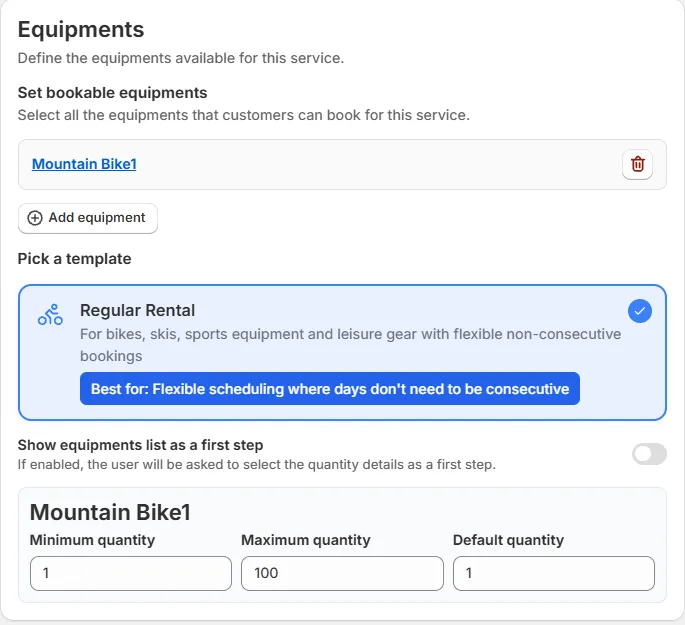
The Equipments card is shown for services that use equipment. The rest of the Availability tab changes with the type of service: multiday and fullday services do not have a Meeting duration, Booking limit or Break times card.
What your customers see
In the booking widget, the customer picks the quantity of each equipment (for example 2 x Mountain Bike). The calendar then shows only the dates where that quantity is available. The label and the available count come from Settings > Translations (see Translations: Customize Every Text of Your Booking Widget):
- Select equipments
- Equipments: Select the equipments you want to book
- N slots available (N is the number of available slots)
Specific rules for multiday services
For multiday services, the Availability tab also has:
- Minimum bookable days and Maximum bookable days.
- Time it starts and Time it ends.
- Is it a pick up + drop off service? See How to Set Up Pick Up and Drop Off Times for Multiday Services.
- Skippable dates.
See How to Configure Multiday Booking Services.
Step-by-step guides by industry
- How to Set Up Bikes, Ski Gear or Trailers as Equipment in Cowlendar
- How to Set Up Sports Fields as Equipment in Cowlendar
- How to Set Up Restaurant Tables as Equipment in Cowlendar
- How to Set Up Boats, Houses or Cars as Equipment in Cowlendar
Common questions
Can I mix teammates and equipment?
The availability mode is one per service. If you also need teammates, read Teammate Settings: General, Availabilities, Buffer Time and Permissions and What Is the Difference Between Availability per Service and Availability per Teammate.
Can I block dates for one piece of equipment only?
Yes. Open the equipment in the Equipments page and use Blocked dates or Break times.
Cette réponse a-t-elle résolu votre question ?